The AIsuru Suite: six enhancements that turn an agent that answers into an agent that works

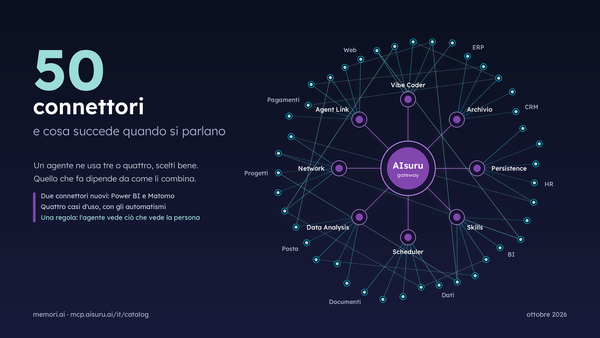
A conversational agent, on its own, knows how to talk. With the AIsuru Suite it learns to remember, act on its own, calculate precisely, consult other agents, be used as a service, and build its own application through conversation.
This article covers all six original connectors in the Suite, with real cases already running in production and scenarios where you could use them tomorrow morning.
Let's start with the scenes
In one company there's an agent that keeps ISO document review under control: twice a day it looks for the oldest document still waiting, works on it, updates its own log, and on Monday morning prepares the weekly summary. Under its care are 82 documents in progress and a catalog of 29 company documents classified by type. No one reminds it: it's just its job.
In one team there's an agent that coordinates calendars: a shared dashboard, a "My calendar" view that shows each person only their own commitments, a booking form, and reminders that fire on their own. It looks like a multi-user management system. It was born in a conversation.
In an industrial group there's an agent that receives a machinery log extract from a huge Excel file living on SharePoint, and calculates durations and totals with exact numbers. Not estimated: calculated.
And then there's the communications plan with its editorial calendar and approval states, the expense report log with 52 registered company cards, the HR assistants that answer staff in two variants for two different employee populations, and even a record archive whose agent, every day, goes off on its own to find a new artist to schedule.
All these scenes share the same origin: the AIsuru Suite, six original connectors that enhance the platform's agents. This article covers them one by one, and then covers the most interesting part: how they combine.
The big picture
AIsuru lets you build conversational agents. An agent, on its own, knows how to talk: to do anything, it has to be connected to tools, and the standard it connects through is called MCP, Model Context Protocol. AIsuru's MCP gateway acts as the conductor toward dozens of connectors: SharePoint, Outlook, Google Workspace, SQL databases, Monday, Zapier, n8n, and many others.
Six of these connectors, however, are different from all the others. They don't connect the agent to a third-party service: they give it capabilities it didn't have before. They're written by Memori, they live inside the gateway (nothing to install, no API key to obtain), they activate with a click, and they're designed to compose with each other. In the catalog you recognize them by the star in their name.
In one line each: AIsuru Persistence is a private database for every agent. AIsuru Scheduler is time as a tool. AIsuru Data Analysis is a deterministic calculator. AIsuru Network lets agents talk to each other. AIsuru Agent Link turns the agent into an MCP server. AIsuru Vibe Coder, patent pending, is the system integrator that lives inside the conversation and ties everything else together.
Here's how they work.
1. AIsuru Persistence: the memory that holds the numbers
The problem
A language model has no memory between one conversation and the next. There are two makeshift solutions, and both are wrong: put the data in the prompt, which becomes huge, expensive, and still doesn't stay up to date; or entrust it to the agent's "knowledge," which is perfect for documents but not for records that change every day. An agent that has to keep an invoice log, a progress status, or the preferences of three hundred users needs a database, not a memory.
What it does
By activating the connector, every agent automatically receives a dedicated database, with its own credentials and permissions limited to that single database. There's nothing to configure: not even a field to fill in. From that moment the agent can create collections, insert and query records, build its own indexes, and even document, on its own, the map of its data, which it keeps versioned: which collections exist, how many entries they contain, which conventions it has adopted.
Two details reveal the care put into the design.
First: conventional indexes are set up by the system itself, after a collection is created, because a language model doesn't think about indexes, and here it doesn't have to.
Second: dangerous operations have guardrails. Automatic deletion of old records is only allowed on explicit date fields, so a distracted agent can't wipe out an archive by setting the expiry on the wrong field; and when the connector is disconnected, the database isn't destroyed, only access is revoked: a wrong click doesn't become data loss.
And then there are views: the agent can generate pages with real data, served from a URL, to show in chat. It's the mechanism that stops it from "narrating" a table: instead of transcribing rows it might get wrong, it opens a window onto the real data.
Where it already runs
In production there are 118 provisioned databases and 99 generated data views. Inside you'll find the ISO document review log with its 82 documents, the catalog of 29 company documents, an eligibility checklist for a regional grant with 27 items and the list of mandatory templates to attach, the expense report log with 52 company cards and 43 already processed reports, an invoice log, a team meeting log.
Where you'd use it
Anywhere there's a log that today lives in a shared spreadsheet and in someone's memory. The engineering firm tracking building permits and their statuses. The workshop with a registry of vehicles under management and their service history. The association with its membership book and dues. The accountant with a per-client deadline tracker. The hospitality property with its room maintenance log. The shape is always the same: records that change, statuses that progress, someone who needs to be able to ask "where do we stand?" and get the truth.
2. AIsuru Scheduler: time as a tool

The problem
A conversational agent only exists while someone is writing to it. Everything that is "every morning," "every Monday," "remind me in three days" is out of its reach. Classic automations solve this with a cron job calling a webhook, but then the logic moves back into code, and the agent becomes a middleman.
What it does
The Scheduler is a timer that opens conversations. On each tick it starts a session with the agent and submits the saved prompt; from there it's the agent that decides which tools to use, in what order, what to write. The consequence is the revolutionary part: the automation is described in plain language. "Every morning at 8, check the customer care inbox and send me a summary of open requests" is, literally, the program.
Tasks can be recurring or one-off, and even multi-phase: after the initial prompt, more messages arrive in the same session, so the agent keeps context and chains steps together. "Search, then write the email, then update the CRM": three phases, one conversation.
And there's the governance side, which you only notice when it matters. Every task belongs to a user and an agent together: only whoever created it can see it. If the task uses email, it can only use the mailbox of the person who created it, checked against the authentication token, not on good faith. If the prompt mentions a connection that isn't active, the task is stopped immediately with a link to authorize, instead of silently failing on every tick. And there's even a test mode that runs through the whole flow without performing irreversible actions.
Where it already runs
In the last thirty days, agents have worked on their own, via Scheduler, almost a thousand times. The ISO document review runs at 4:00 and 19:00, plus the Monday morning summary at 5:00, with an instruction that's a small design lesson: if there's no document waiting, stop and don't send anything. The evening recap of the customer care inbox goes out at 19:30. The nightly CRM sync runs in four chained phases. On the first of the month, at 9:00, the invoice reminder for two software vendors fires. And every day an agent goes hunting for a new artist for a record catalog.
Where you'd use it
The outpatient clinic that prepares the recall list for annual checkups every morning. The law firm with the weekly review of procedural deadlines. The e-commerce store with the report of orders left pending. The purchasing office with the monthly reminder for missing supplier documents. The rule for spotting candidates is simple: if there's something in your company that someone "has to remember to do," it's a six-line prompt with a time attached.
3. AIsuru Data Analysis: the calculator that doesn't guess
The problem
Asking a language model how many rows a 22 MB Excel file has, or what the sum of a column is, is asking it to do something it can't do. The file gets truncated, the numbers get "read" and reconstructed, and the result is plausible instead of exact. On a report of actuals, plausible is unacceptable.
What it does
With Data Analysis, the agent doesn't read the numbers: it calculates them. It writes analysis code and runs it on the real data, in an isolated environment that receives the dataset already converted into a processable structure. Counts, groupings, rankings, averages: deterministic and reproducible. The thesis in one sentence: you don't ask a model to be a calculator, you give it a calculator.
There's also a piece of invisible work worth mentioning: the bridge with SharePoint and OneDrive. Corporate sharing links are full of redirects, protections, and viewers; the gateway recognizes them, downloads the file authenticating properly, converts the Excel sheet into a data structure, and passes it to the calculation engine, even overcoming truncation limits on large files. For whoever uses the agent, none of this exists: they paste a link, ask a question, get real numbers.
Where it already runs
It's the Suite's most widely used native connector, with 265 agents configured: the second most installed connector on the entire platform. The industrial group's case is already in the opening scene: converting Excel dates, calculating durations, summing times. And there's a professional detail we like to mention: the first thing the agent does in front of a new dataset is an exploratory inspection — how many rows, which columns, a sample of the first few. Exactly the first step a flesh-and-blood analyst would take.
Where you'd use it
Job cost actuals to compare against estimates. Warehouse stock levels with turnover rates by category. Supplier price lists to cross-check at every renewal. Attendance and overtime to reconcile at month end. The rule of thumb: whenever someone opens an Excel file and starts adding up numbers by eye, there's an agent that could do it with code instead.

4. AIsuru Network: agents that consult each other
The problem
An organization doesn't have one agent: it has many, each an expert in something. The HR agent knows the regulations, the quality agent knows the procedures, the sales agent knows the CRM. Concentrating everything into a single all-knowing agent doesn't work: unmanageable prompt, confused knowledge, permissions impossible to separate. What's needed is the ability to consult each other.
What it does
With Network, an agent can query another agent in two ways. Knowledge search: fast, synchronous, no generation on the other end, perfect for "find me the procedure that talks about X." And the real question: the other agent answers, with its own model, its own knowledge, and its own tools. If the answer takes time, nothing gets blocked: the agent receives a receipt and picks up the answer as soon as it's ready, even in the next message, with an explicit rule in its instructions: if the answer hasn't arrived yet, don't make it up.
And there's the detail that makes it all usable in a company: identity travels along the chain. When an authenticated user queries agent A, and A consults B, the original user's identity is transmitted in signed form. B knows on whose behalf it's working, and permissions stay permissions even across the hops. Without this, a chain of agents would be an elegant way to bypass controls; with this, it's an organization.
Where it already runs
In production there are 72 active conversations between agents. The real questions they exchange are wonderfully ordinary: "How many jobs does this person have assigned? Consider all jobs, not just mine," from a sales agent to the projects one. The full list of document review status, 82 rows with paths and links, asked of the quality agent. The admission requirements for a degree course, forwarded to the agent that holds that knowledge. And our favorite, found in the logs: "Who are you? What's your purpose?" One agent introducing itself to another. Mutual discovery between agents is already happening.
Where you'd use it
The sales assistant that asks the warehouse agent about availability before promising a delivery. The HR helpdesk that forwards the specialist question to the payroll agent. The sales-network agent that consults the product agent on technical specs. Each agent stays small, specialized, and governable; expertise gets composed at the moment the question is asked.
5. AIsuru Agent Link: the agent becomes a service
The problem
A carefully built agent is an asset: it knows the documents, the procedures, the company's tone. But it stays trapped inside its chat. If you want to use it from Claude, from Cursor, from another system, or inside your own application, you'd have to rebuild everything elsewhere.
What it does
Agent Link reverses the direction: instead of connecting tools to the agent, it exposes the agent as a standard MCP server, reachable from any compatible client. Your agent enters the toolchain of whoever you decide.
Access has two tiers, and the separation is structural. With a consumption token you connect to query: ask questions, search the knowledge, manage your own conversations. With a management token, reserved for the owner and time-limited, you can do much more: manage content and functions, improve the prompt with preview and the ability to roll back, read statistics and unanswered questions. Put directly: from Cursor or Claude you can build an AIsuru agent, using the same protocol you'd use for any other tool. And with a consumption-only token, the management tools simply don't exist: they don't appear, and if invoked by name they respond "doesn't exist." It's not permission denied: it's invisibility.
The owner can also reduce the surface: for example, exposing only knowledge search, obtaining a corporate "knowledge API" that answers on documents with no generation costs. And every user has their own conversation, even behind the same token: two people on the same integration never get mixed up.
Where it already runs
It's the Suite's youngest connector, and the growth curve says it all: 11 active endpoints created in two weeks, 24 tokens issued. The prevailing use today is "letting the agent be consulted from outside": the first step of every integration.
Where you'd use it
The product assistant exposed inside the partner portal. The knowledge API that feeds your mobile app with the corporate agent's answers. The technical documentation agent hooked up to Cursor, so developers can ask it questions without leaving the editor. And for those who build agents professionally: maintenance via MCP, with content updated by scripts instead of by hand.

6. AIsuru Vibe Coder: the system integrator inside the conversation
The problem
The other five connectors give capabilities. But someone has to put them together: activate the right connections, design where the data lives, build the interfaces, decide who sees what. Normally that someone is a developer, and the client talks to them. The Vibe Coder removes that step: the agent builds its own application while the owner describes it in conversation.
What it does
It's the Suite's most ambitious connector, and it works on six fronts at once. It knows what it's doing: it consults internal versioned guides on platform topics and even recognizes which channel it's speaking on (web chat, API, scheduled task, or another agent) adapting what it produces. It orchestrates the infrastructure: it browses the connector catalog, including enterprise ones pre-configured by IT, and activates and configures them by talking; changing an expired key or switching to another database happens in conversation. It builds interfaces: real pages with a stable URL that re read the data on every opening, choosing among 11 models (table, cards, detail, metric, form, calendar, chart, map, dashboard, guided wizard, and free HTML) with charts drawn server-side and file uploads. It lives inside the web component: when the agent is embedded in a website, it can drive the page hosting it, open panels, inject forms, react to events. It governs: it takes a snapshot of the application's state, flags gaps ("you don't have persistence: this data won't survive"), saves the owner's rules on who builds and who sees what, and applies branding (colors, logo, and tone of voice) in one move. And it improves the agent itself: it observes unanswered questions, proposes evolutions, applies them only with confirmation, and can roll back.
Two principles deserve mental bold. The first: deny by default. Until the owner defines the rules, no end user builds anything and no one sees anyone else's data. The second: test before publishing. When the agent creates a view connected to a source, the system actually makes the call and publishes only if the test succeeds: better no view than an empty view.
On this architecture Memori has filed a patent application: patent pending. We won't discuss the contents while the proceeding runs its course; the result, however, is all laid out below.
Where it already runs
The applications in production have concrete names and purposes. Communications Plan: editorial calendar, content, approval states, with dashboard, calendar, table, form, and webhooks to change status. A small management system born in chat. processAI: the ISO process agent, with a live document catalog, gap analysis, and a compliance status chart. CalendarIA: team calendar coordination, with the shared dashboard and the personal view tied to whoever is logged in: the same view, different data for each person, a concept straight out of enterprise software obtained without writing a single line of authentication code. LinkedIn Post Maker: each user's posts, the composition form, company information. And then car rental with catalog and bookings, personal photo albums with image uploads, HR assistants in two variants. In total: 33 published views, 10 registered endpoints, 9 applications with defined governance rules.
Where you'd use it
An association's member desk, with memberships and receipts. Meeting room booking with a shared calendar and a personal view. A construction-site log with photos uploaded via form directly from a phone. The point isn't the specific case: it's that there's no template. The right application emerges from the conversation with whoever will use it.
The real value is in the combinations
Each connector on its own is useful. But the cases that really work in production use three or four together, and these chains are the most interesting story.
The ISO document cycle. Persistence keeps the log of the 82 documents under review and the catalog of the 29 company documents. The Scheduler opens the conversation twice a day and on Monday morning. The agent picks the oldest document waiting, works on it, updates the log. The Vibe Coder publishes the live catalog, the documents under review, and the status chart. And Network lets another agent ask this one for the full list. Four Suite connectors, plus SharePoint and email. None of the pieces, on its own, would be a product; together they're a business process that manages itself.
Calendar coordination. Persistence stores the commitments, the Vibe Coder publishes the team dashboard and the personal view, a webhook receives new bookings, the Scheduler opens the reminder conversations. The result looks like a multi-user management system, and it was born by talking.
Analyzing the big file. SharePoint stores the extract, the gateway converts and republishes it, Data Analysis calculates with code, the agent comments on exact numbers. The chain exists to guarantee just one thing: that the figures are true.
The expertise network. A sales agent asking a colleague about projects, an agent asking quality for document status: each agent stays specialized and small, and knowledge gets composed at the moment the question is asked, with the user's identity traveling along the chain.
Adoption numbers
A snapshot of the production environment, measured against the database on July 28, 2026, not estimated: 265 agents use Data Analysis, which is the second most installed connector on the entire platform. 118 databases provisioned by Persistence, with 99 generated data views. Almost a thousand conversations opened by the Scheduler in the last thirty days. 72 active conversations between agents on Network. 33 published views and 9 applications governed by the Vibe Coder. 11 Agent Link endpoints created in the first two weeks after release. The Suite isn't an announcement: it's in production, and these are the counters.
For businesses: governance is part of the product
The whole Suite shares the same setup. Sensitive powers always depend on a verified identity, confirmed by an authentication token, never on a declared email. Application governance is default-deny. Credentials are encrypted and never come back out: not to the model, not to the browser; the agent only knows that "authentication is configured," and at call time the gateway injects it, server-side. Changes to agents are tracked, with before and after, and reversible. External access tokens are stored only as a fingerprint, shown in plaintext just once, with expiry for management tokens. And all of this builds on Memori's compliance path, with ISO certifications while including ISO/IEC 42001 on artificial intelligence management systems and NIS2 compliance.
Frequently asked questions
Do I need to install anything or get API keys?
No. The Suite's six connectors live inside the AIsuru gateway: they're activated from the catalog with a click, and provisioning is automatic.
Is Persistence the agent's memory?
It's something more precise: a database for structured records, logs, statuses, catalogs, preferences. Conversational memory and document knowledge are other mechanisms, and they coexist with it.
Does the Scheduler perform actions on the agent's behalf?
No, and that's the beauty of it: it opens a conversation and lets the agent decide, using its own tools. That's why the automation is described in plain language instead of being programmed.
Does Data Analysis read my files?
It calculates them. The file is converted into a data structure and the agent runs the analysis code on top of it: the numbers are calculated, not "read" and reconstructed.
Do agents connected via Network merge together?
No: they consult each other. Each stays separate, with its own knowledge and its own permissions, and the identity of whoever asked the original question travels along the whole chain.
What do I need to build an application with the Vibe Coder?
The ability to describe your own process. The onboarding questions are business questions: what it's for, who uses it, who sees what. The rest emerges from the conversation.
How long does it take?
Activating each connector is one click. The first application, from "let's start" to a working panel, is measured in minutes, with no deployment.
How to start today
The Suite's six connectors are in the AIsuru integrations catalog, recognizable by the star: Persistence, Scheduler, Data Analysis, Network, Agent Link, and Vibe Coder. They activate with one click, they combine with each other, and the Vibe Coder knows how to activate the others when needed.
If you want to see them work on your own processes, with your own data and your own rules, write to us at demo@memori.ai with the subject DEMO SUITE: we'll set up a personalized demo, and build it in front of you.
An agent that answers is an assistant. An agent with the Suite remembers, acts, calculates, consults, integrates, and builds. It's a colleague. And as of today, you know exactly what it can do.