What's new in AIsuru | v11.0.0
Welcome back to the AIsuru release notes v11.0.0! Here you'll find new features, improvements, and bug fixes to make your AI Agents more powerful and secure 🚀
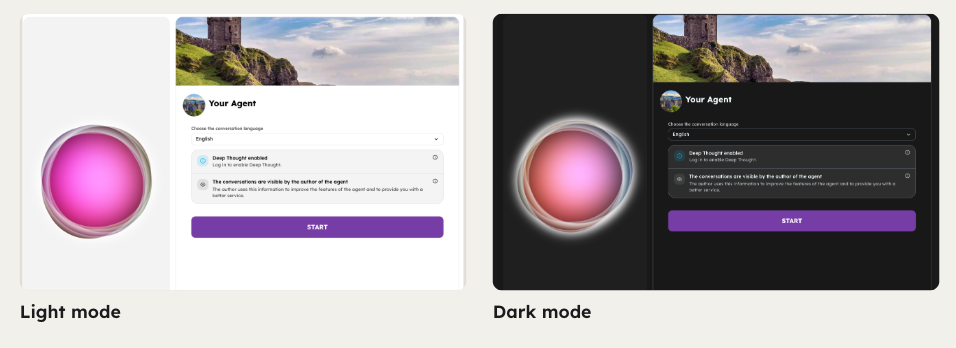
We are excited to roll out memori-react v9!This update delivers a brand-new look and feel across all chat layouts while keeping all core functionalities intact.
A unified, lighter interface
Every layout (chat, full page, website widget, totem, and hidden chat) now shares one consistent design for buttons, panels, menus, and animations. Light and dark themes are now applied seamlessly across menus, side panels, and notifications too, and brand colors are respected far more consistently throughout the experience.
Refined header & mobile experience
The header is now cleaner and lighter, with secondary actions tucked neatly into the menu. On mobile, you'll notice a shorter top bar and a more intuitive side menu.
Smarter onboarding & history
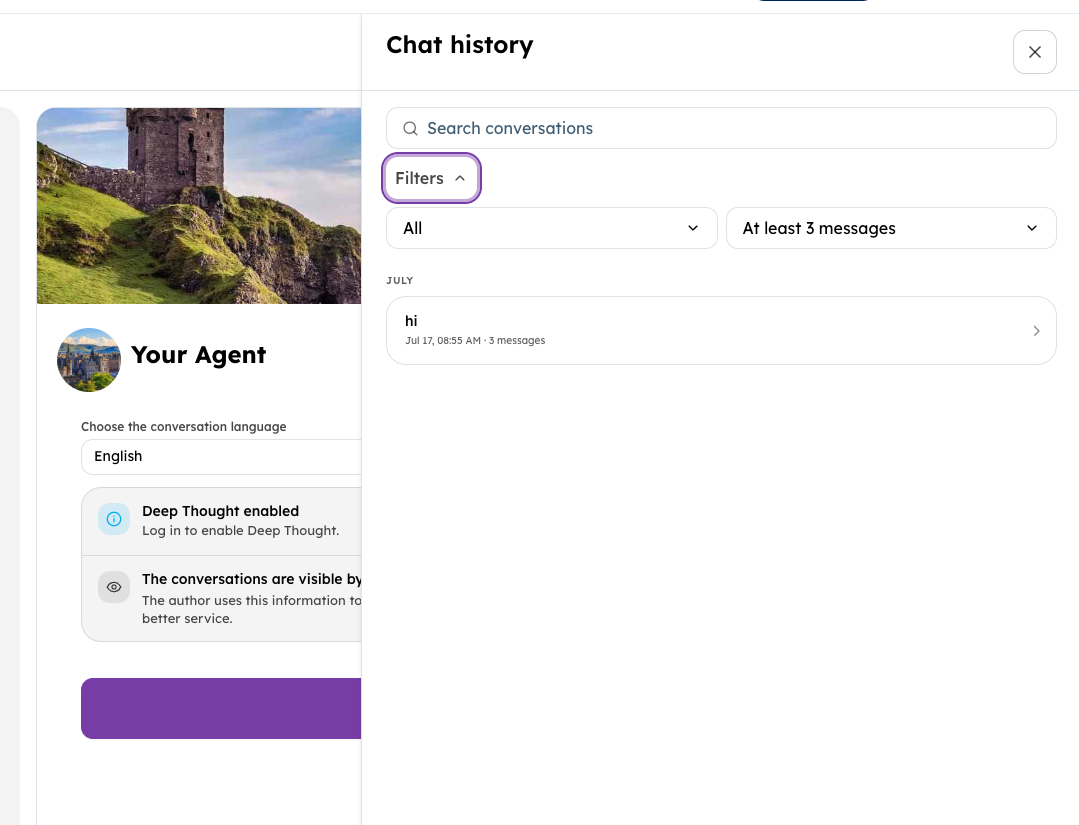
The start screen is clearer, with title, language, and settings front and center. Conversation history has been redesigned too, now with built-in search and filters so you can find past chats faster. Long replies can be expanded or collapsed, system messages are more consistent, and keyboard/screen reader accessibility has been upgraded.
⚠️ Important notice for system integrators:
if you use custom CSS on the widget, please note that class names have changed. We recommend a quick visual review of your integrations following this deployment. [link to blog post]
Layouts & artifacts
Chat history is now available in the Website Assistant layout and in the mobile session panel, alongside AI usage metrics. And when only one action is available on a message, clicking the button now triggers it directly (no need to open the three dot menu first).
The artifact column is also now resizable in the Chat layout, using the same drag handle you already know from Full Page and Zoomed Full Body.
Authentication & credit management
When an agent requires authentication, logging out now properly tears down the session: it redirects to the start panel, stops any voice input/recording, and clears the chat. Messages that arrive after logout are discarded, and the history panel closes automatically.
We've also added an autostart guard: autostart now stays paused until the required login and location parameters are satisfied, keeping the start panel visible until everything is ready.
New models are now available
Added support for claude-opus-5-5, claude-sonnet-5-5, gpt-6-luna, gpt-6-sol, gpt-6.1-sol.
Additional Highlights in This Release
- Web Integrations:Added light/dark theme support to the landing experience.
- Voice Enhancements:STT and TTS now enforce session-id validation and rate limiting. Azure STT has been updated to use continuous recognition with confidence score tracking.
- Contacts Bug Fix:Renaming a contact's role now immediately reflects in pending invitations, without needing a page refresh.
Enhanced Security
We added a maximum attempt limit for OTP logins and shortened the expiration time of the sent token, making the login flow safer against abuse.
🐞 WHAT WE FIXED!
- SCORM switch button was disabled even when activated on the setup platform/limit page
- Chat now sizes to the host slot instead of 100vh, so embeds no longer cover other page sections
- Fixed document import failing when charset auto-detection used unsupported encodings (e.g. windows-874)
- Fixed
currentDialogStatenot updating when uploading media, which caused the LLM message to be lost - Avoided re-applying stale dialog state when resuming a tab
- User notifications no longer show up incorrectly in chat layout pages
- Connected MCP servers now show the correct catalog logo instead of a wrong fallback icon
🛠️ As always, we’ve addressed various minor bugs and implemented performance improvements across the platform to ensure a smoother, faster experience.
💡 Need help with AIsuru? Want to explore the AIsuru AI Academy? Contact us at demo@memori.ai