What's new in AIsuru | v12.0.0
Welcome back to the AIsuru release notes v12.0.0! Here you'll find new features, improvements, and bug fixes to make your AI Agents more powerful and secure 🚀
See what your agent is doing
When an agent uses a tool, the chat no longer shows just a loader. While the agent works, short lines appear under your message describing what is happening in plain words, written by the agent for that conversation: for example “Searching the web for recent news” or “Looking up your order”.
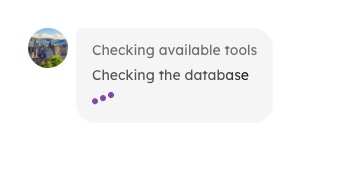
- One line per activity, not per call: many lookups in the same service show as a single line, such as “Checking the project planning…”.
- Up to three lines are visible at a time: each new one enters from below while the oldest leaves the view. With reduced motion turned on, new lines simply fade in.
- Lines never mention tool names, data, or the systems behind them (databases, tables, services), and they are written in the language of the conversation.
- It works with every kind of tool an agent has, webhooks and MCP connectors alike, whoever set it up.
- The lines are shown only while waiting: when the answer arrives they disappear, so the finished chat stays clean.
A brand new models page!
We’ve completely redesigned the configuration of LLM models, AI providers, and completion parameters available to your agents.
- A clearer list: every configuration shows its scope (User, Tenant, or AIsuru), visibility, enabled purposes, and whether it’s a default for new agents. Configurations provided and charged by Memori are marked with a dedicated tag.
- Advanced parameters: each provider now has its own set of parameters, with recommended defaults you can restore at any time. Depending on the provider you can set reasoning and reasoning effort, the reasoning budget, adaptive thinking and how thinking is displayed, verbosity, timeout, penalties, prompt cache, and how images are delivered to the model (as URL or base64).
- Context window: every configuration now declares the real context window of its model, which you can find in the provider’s documentation.
- Custom HTTP headers: you can add headers that are sent to the provider with every request, for example to route traffic through a corporate gateway. Authentication headers stay managed by the server.
- Easier provider setup: providers have clearer names, including “OpenAI compatible (Ollama, LM Studio, vLLM…)” for models served by your own gateway, where the API key is now optional. For Google Vertex AI, the endpoint is generated automatically from endpoint type (regional, global, or multi-region), region, and model; for AWS Bedrock, the form explains which Model ID to use.
- Safer credentials: saved API keys are never shown again. You can keep them or replace them, and when you duplicate a configuration you’re asked to enter them again.
- Apply to agents: from a configuration you can now apply it directly to your agents or to all agents of the tenant, choosing the purpose and whether to update only agents still on the default configuration or all of them. Agents with strong encryption are left untouched.
- Names and sharing: the same name can now be used in different scopes. Sharing a configuration is permanent, so we now ask for confirmation before saving.
⚠️ Important notice for authors and tenant admins:
Configurations that don’t have model parameters yet are marked “To complete” in the list. Until you set the context window and save, chats using that configuration return an error.
Configurations stored in the legacy custom model format have been converted automatically: please check name and context window before saving.
Prompt cache in AI usage
The AI consumption details of each message now show how many input tokens were read from or written to the provider’s cache, together with the share of input tokens that didn’t need to be processed again. A higher value means lower cost and latency, and a tooltip explains it right where you see it.
Testing advanced functions
Testing an advanced function from its panel now runs it within the current session, so functions that depend on session data behave as they do in a real conversation. Errors returned by the function itself are now reported as a failed test, not as a success.
New models are now available
Added support for claude-fable-5-2.
Interface and styling
Tooltips and menus inside side panels are now positioned correctly, the conversation area is wider on large screens, and the user avatar is more visible in dark theme.
🐞 WHAT WE FIXED!
- On mobile, the privacy policy is now opened in a modal from the start panel, instead of a tooltip that disappeared before you could click the link.
- Markdown tables in the artifact preview now scroll properly.
- The action row under chat messages is no longer clipped at the bottom of the conversation.
- AI usage data is now kept even when an answer takes too long and the request times out.
- Fixed temperature handling for models on Google Vertex AI.
- The reminder the platform adds to each message, asking the model to follow the system prompt and governance rules, is now kept clearly separate from the user’s text.
🛠️ As always, we’ve addressed various minor bugs and implemented performance improvements across the platform to ensure a smoother, faster experience.
💡 Need help with AIsuru? Want to explore the AIsuru AI Academy? Contact us at demo@memori.ai