Aisuru Google Workspace
Gmail, Drive, Docs, Sheets, Slides, Calendar, Chat, Tasks and Forms. The AIsuru agent acts within your Workspace, with verified identity and credentials the model never sees.
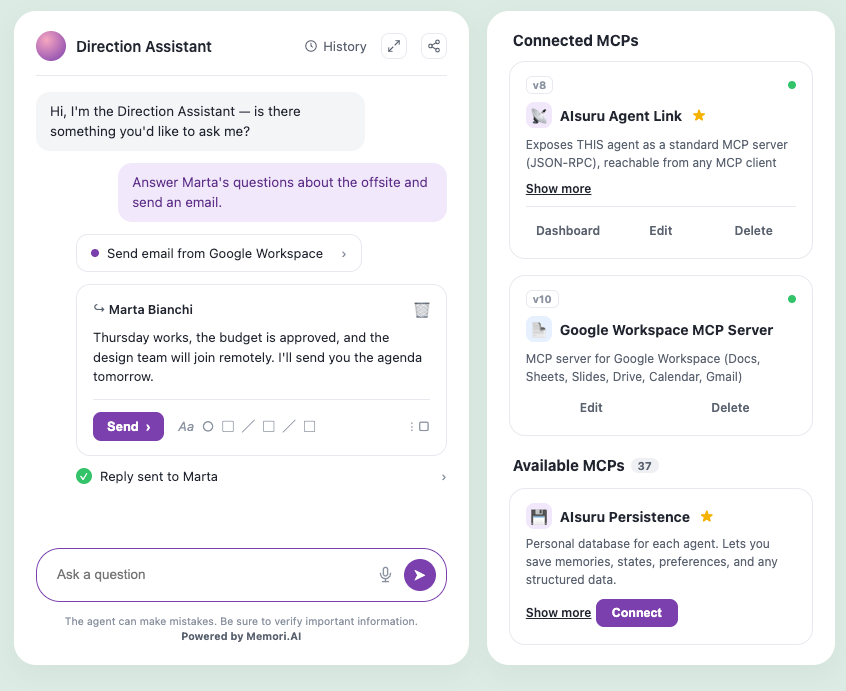
Gmail, Drive, Docs, Sheets, Slides, Calendar, Chat, Tasks and Forms. The AIsuru agent acts within your Workspace, with verified identity and credentials that the model never sees.
Category: Productivity
Available in: AIsuru Agents and via Agent Link, in Claude, Cursor and every MCP client
Built by Memori S.r.l.
Capabilities: Read and write 120 tools (list as of 11/08/2026) Security verification CASA AL1 App Defense Alliance, TAC Security assessment, report dated 24/08/2026 Documentation · CASA Certification · Privacy Policy
Connect Google Workspace to an AIsuru agent to work on email, files and documents through natural language. The agent reads Gmail threads and replies, searches and organizes files in Drive, reads and writes Docs, Sheets and Slides, manages events in Calendar, spaces in Chat, tasks in Tasks and forms in Forms. With Agent Link the same agent exposes itself as an MCP server: you query it from Claude, from Cursor, or from another agent, and it acts in the Workspace following the rules you've given it.
It's not the model that performs the action. The model proposes the tool and the values; AIsuru's MCP gateway verifies who is asking, checks that the permission exists, executes and logs it. The model proposes. The infrastructure disposes.
What you can ask
Reply to a thread
"Reply to Marta's questions about the offsite and send the email."
Search Drive
"Find the latest document on the product roadmap and summarize it for me."
Extract from documents
"List the action items assigned to me in all of this week's meeting notes."
Organize files
"Move last quarter's plans to the archive folder and share them with the marketing team."
Work on spreadsheets
"Add the rows from this quote to the orders sheet and format the amounts column."
Manage the calendar
"Find a free one-hour slot with Luca next week and create the event."
How permission works
When you connect the connector, the agent doesn't learn the tools by heart: it has the gateway tell it about them and uses them when needed. An updated connector brings new tools without rebuilding the agent. The rules, however, are decided in advance and apply to every session.
- Encrypted credentials, never to the model. The model only knows whether authentication is configured. The Google token is held by the gateway.
- The model is never the authorizer. A convinced model can misuse the permissions it holds: that's why permissions are granular and the perimeter is decided by the agent's owner.
- Verified identity, not declared. Whoever performs the operation remains you: the connector distinguishes what is allowed for you from what is allowed for someone else, and verifies it at every session opening, even when the agent is reached via Agent Link.
- Default-deny. No rule means no permission.
- Audit of every action. Every executed tool leaves a trace: who, when, which tool.
Why we did CASA
To access sensitive Google Workspace scopes, such as a user's mail and files, Google requires applications to undergo a security verification according to the App Defense Alliance's CASA standard. We submitted AIsuru to the assessment, conducted by TAC Security on the ADA CASA v2.1.1 specification with grey box methodology and manual verification.
The report, issued on August 24, 2026, covers six security domains and 48 specific controls derived from OWASP ASVS: authentication, session management, access control, communications, data validation, configuration. No control produced a negative result. It is the verification that unlocks the Google Workspace connector, and adds to, without overlapping, the five ISO certifications and NIS2 compliance already documented in the Trust Center.
What you need to know
The actual list of tools may vary depending on the connector's configuration. Requests involving the language model follow the residency and retention rules of the LLM provider chosen by the customer: the full table is in the Trust Center, Data residency page. The full CASA report is confidential, like penetration tests; a summary can be requested at privacy@memori.ai. The connector does not replace your Workspace's sharing policies: it acts within the permissions of the connected account, never beyond.
Want to see it in production, not in a demo?
Write to demo@memori.ai with subject DEMO SUITE. You get into production with the rules, not despite the rules.
Coverage
- Gmail: search, read, reply, drafts, labels, filters
- Drive: search, read, create, move, share, permissions
- Docs: create, edit, tables, comments, PDF export
- Sheets: read, write, format, tables, comments
- Slides: create, update, thumbnails, comments
- Calendar: events, availability, out of office, focus time
- Chat, Tasks, Forms, Contacts, Apps Script
CASA assessment
| Specification | ADA CASA v2.1.1 |
| Level | AL1 |
| Method | Grey box, manual verification |
| Assessor | TAC Security |
| Report | August 24, 2026 |
| Controls | 48 across 6 domains, no negative results |
Full profile in the Trust Center
Memori attestations
ISO 9001:2015 ISO/IEC 27001:2022 ISO/IEC 27017:2021 ISO/IEC 27018:2020 ISO/IEC 42001:2023 NIS2 Compliance CASA AL1
Related connectors
Productivity: Microsoft Outlook Mail and calendar for Microsoft 365 with verified identity at every session.
Documents: SharePoint Sites, libraries and documents. Released open source by Memori.
AIsuru Suite Persistence: A dedicated database per agent, to remember across sessions.
AIsuru Suite Agent Link: The agent exposed as an MCP server to Claude, Cursor and other agents.
AIsuru Suite Scheduler: The agent can schedule tasks to be carried out autonomously.