Giving an agent the codebase to read, without giving it the server
An MCP connector that exposes the repositories read-only, on a dedicated machine. Why the convenient road does not work, how the permission model is built, and what the agent can actually do.
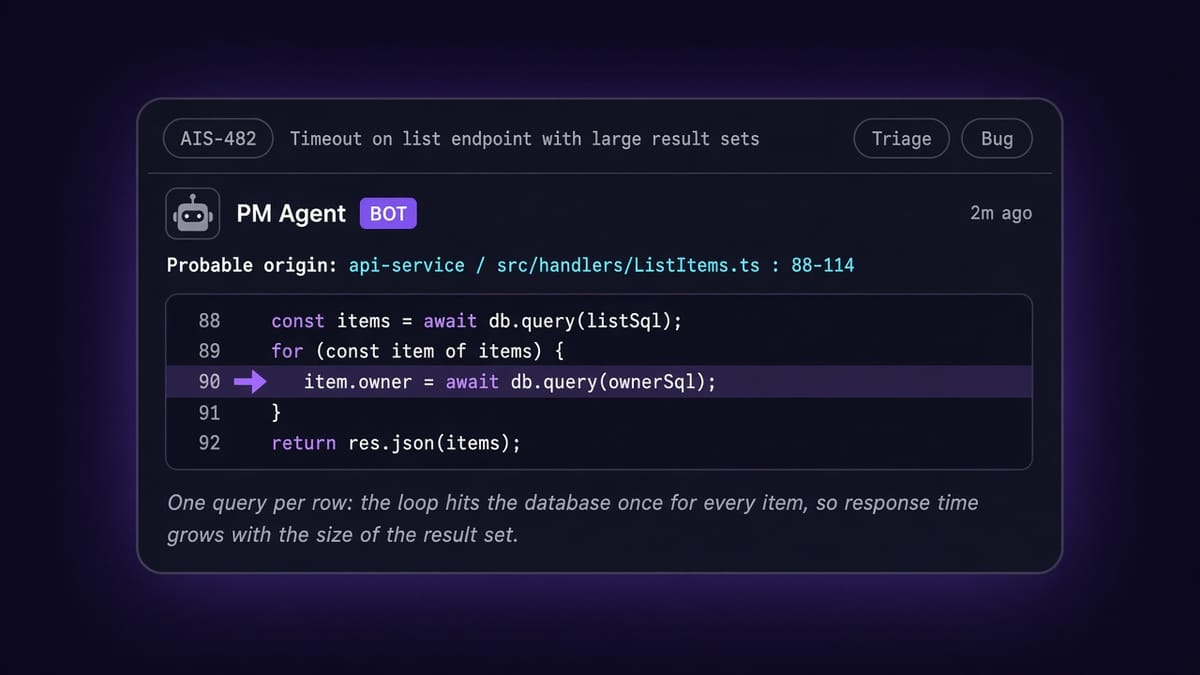
When we built our project manager, the thing that made it genuinely useful wasn't the Linear integration. It was being able to say «this bug probably starts here», with the right file name and the right lines, while triaging a ticket that came in from support. To do that, an agent has to be able to read the product's code.
Put that way it sounds trivial: give it access to the repository and off you go. The point is that how you grant that access decides everything else, and the convenient way — the one where the agent runs commands on a machine that already has the code — is also the way in which, the day something goes wrong, there is nothing standing between a prompt and your codebase.
So we wrote a dedicated MCP connector, running on a server of its own, whose only purpose is to expose the repositories read-only. This post is about how it is built and, above all, why it is built that way.
The trouble with the convenient road
The MCP protocol allows a server to be started locally by the client itself. That is how most connectors get tried out, and it is perfect for development: zero infrastructure, it starts and it works.
Applied to source code, though, that road has three consequences worth looking at squarely. The process inherits the identity of whoever started it, so it sees everything that user sees, not just the code. It lives alongside the rest of the platform, which means alongside the credentials and the connections to the other services. And the source code has to sit there, in the middle of all of it.
Three properties that are individually tolerable and that together describe exactly what you do not want: a component that reads files, driven by a language model, running where you keep your secrets.
A dedicated host, and two users who do not trust each other
The connector therefore runs on a machine of its own, whose only job is that. There is nothing else on the host worth reaching, and this changes the security question: no longer «what can this process touch on a machine full of things», but «what is on this machine». The answer is: read-only copies of a few repositories, and nothing else.
On the host the separation continues, and this is the heart of the permission model. There are two system users, neither of which can log in, with two deliberately incompatible roles.
The first owns the copies of the code and the keys used to reach the repositories, and it is the only one that talks to the outside world: every few hours it updates the working trees, and it does nothing else. The second runs the connector, has no administrative privileges, holds no keys, and on the code has read permission only, because the files belong to the first user and reach the second through a system group that grants exactly that and no more.
The consequence is the part that matters. Even granting that someone manages to make the MCP process do something it shouldn't, that process has no right to write to the code and holds no credentials with which to talk to the remote repositories. This is not an application rule that a bug can get around: it is the filesystem, the layer underneath anything the application does. The service is also started with the protections the operating system provides — no privilege escalation, no access to home directories, and the code tree mounted read-only — so that even misconfigured permissions would meet a refusal one step further down.
One detail of the periodic update is worth telling, because it is a decision and not an accident: immediately after pulling in the changes, the procedure deletes the local configuration files from the working copies, keeping only the example templates. The code the agent reads is the code, not the configuration with the secrets in it. If one of those files ends up in a repository by mistake, the next round takes it out.
The tools, one by one
The connector exposes eight tools, and they are all verbs of reading.
| Tool | What it does |
|---|---|
codebase_list_repos | Lists the available repositories, with branch and current commit |
codebase_tree | Shows files and folders under a path, at limited depth |
codebase_search | Searches content for a pattern and returns path, line and snippet |
codebase_read | Reads a window of lines from a file, not the whole file |
codebase_git_log | Commit history, filterable by author, date or path |
codebase_git_show | The contents of a revision: a commit, a tag, a file at a given revision |
codebase_git_diff | Differences between two references |
codebase_status | How stale the data is, and where each repository stands |
There is no tool that runs arbitrary commands, and there is no writing: no pull, no commit, no push. The interesting part, though, is how the three history tools are built, because that is where the holes usually open. «Don't expose a push tool» is not enough: git is a single program that does a thousand different things depending on how you call it.
The rule we adopted is that the permitted subcommands are listed one by one, rather than the forbidden ones — a list of prohibitions is always incomplete, and forgetting a single entry is all it takes. No request ever passes through a shell, so there is no command line to slip something into. And commit or tag references arriving from outside are examined before being used, because a revision name that begins with a dash is an option in disguise, and that is the oldest trick in the book.
The same goes for paths, which is the least glamorous part and the most important. Any path arriving from outside is resolved all the way down, following any links, and if the result lands outside the permitted repositories the request is refused. How the path is written does not matter: what matters is where it actually lands. A link halfway down the tree pointing outside the codebase opens no door.
Ceilings on everything, for a reason other than security
There is a second family of limits, and it does not protect the machine: it protects the agent. A read returns at most a few hundred lines, a search a few dozen results, the tree stops at a handful of levels, the history at a handful of commits; and any operation that takes too long is cut off.
The reason is that a model's context is as scarce a resource as a machine's memory, and a tool that can return an entire file will sooner or later return an entire file, burning in one go the space the reasoning needed. With the ceilings, the cheap way of working becomes the only possible one: first you orient yourself, then you search, then you read a narrow window around what you found. It is exactly the procedure we recommend to the agent in the tool descriptions, and the limits make it mandatory even when the agent gets distracted.
It is worth saying plainly: the data is not real-time. The agent reads a copy refreshed every few hours, and it has a tool for finding out how old that copy is. For working out where a bug comes from, that is fine; for checking whether a change made ten minutes ago fixed something, it is not. That is an accepted trade-off, not an oversight.
What it taught us
What we take away is that, when you give an agent access, the right question is not which tools to expose. That is the easy part, and a list like the one above settles it. The right question is what happens if one of those tools is used in a way we did not anticipate, and the only answer that holds is that the limits must sit beneath the application: a system user with no write permission, a read-only filesystem, a machine with nothing else on it to take.
Everything else — the hand-listed subcommands, the references checked before use, the paths resolved all the way down — is good engineering, and it matters. But it is the second line. The first is that, even getting all the code wrong, that process still has no way to write anything.